
ここでは、C#フォームアプリにおいて、サムネイル画像を作成するサンプルコードを掲載しています。
スポンサーリンク
サムネイル画像を作成する
ここでは、C#フォームアプリケーションから PresentaionCore.dll を参照に追加して、サムネイル画像を作成するサンプルコードを掲載しています。なお、本サンプルは、参照の追加で PresentaionCore.dll を追加する必要があります。
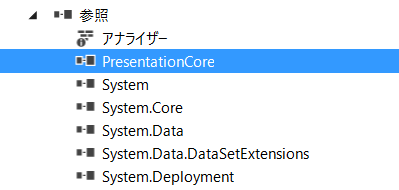
参照設定 – PresentationCore
//using System.Windows.Media;
//using System.Windows.Media.Imaging;

    int thumbnailWidth = 500;  // サムネイル画像の最大幅
    int thumbnailHeight = 300; // サムネイル画像の最大高さ

    string srcImageFile = @"/path/to/src/image.jpg";   // 元画像ファイルパス
    string thumbImageFile = @"/path/to/src/thumb.jpg"; // サムネイルファイルのパス

    // 画像ファイルの縦横のサイズを取得
    Image img = Image.FromFile(srcImageFile);
    double sourceWidth = img.Width;
    double sourceHeight = img.Height;
    img.Dispose();

    // 画像ファイルを開く
    using (FileStream sourceStream = File.OpenRead(srcImageFile))
    {
         // BitmapDecoder オブジェクトを作成する
         BitmapDecoder decoder = BitmapDecoder.Create(sourceStream,
                                                      BitmapCreateOptions.PreservePixelFormat,
                                                      BitmapCacheOption.Default);

         BitmapFrame bitmapSource = decoder.Frames[0];   // 画像ファイル内の1フレーム目を取り出す (通常1フレームのみ)

        // 最大サイズ / 元ファイルサイズで拡大率を算出
        // 比率の大きい方に併せてサムネイル画像を作成する
        double scale = thumbnailWidth / sourceWidth;
        if(thumbnailWidth / sourceWidth >= thumbnailHeight / sourceHeight) {
            scale = thumbnailHeight / sourceHeight;
        }

        // サムネイルを作成する
        TransformedBitmap scaledBitmapSource = new TransformedBitmap(bitmapSource,
                                                                     new ScaleTransform(scale, scale));

        // エンコードを作成
        BitmapEncoder encoder = new JpegBitmapEncoder();

        // エンコーダーにフレームを追加
        encoder.Frames.Add(BitmapFrame.Create(scaledBitmapSource));

        // サムネイル画像をファイルに出力する
        using (FileStream thumbStream = File.OpenWrite(thumbImageFile))
        {
            encoder.Save(thumbStream); // ファイルに保存
        }
    }